Model Context Protocol
Point your assistant
at your warehouse.
Dataki runs a remote MCP server. Add it as a connector in Claude or ChatGPT, sign in once, and they can query the sources you have connected — writing the SQL, saving dashboards and publishing embeds as you, and never seeing a database credential.
https://dataki.ai/api/mcp Nothing to install · no API key to paste · scopes, team restriction and spend ceiling all still apply · every query logged.
01 Connecting
Add the connector. Sign in. Ask.
Nothing to install, no config file, no API key to paste. Claude and ChatGPT take the endpoint on its own and sign you in to Dataki, where you approve what they may do and can change it later.
-
01
Add a connector in your assistant and give it this URL.
https://dataki.ai/api/mcpIn Claude: Add custom connector.
-
02
Sign in when it asks, and approve what it may reach.
Your assistant gets its own credential, which you can revoke. Nothing is typed into a config file.
-
03
Ask a question.
If you have not connected any data yet, it will hand you a link and wait. That takes about a minute.
Step by step, for the assistant you use:
 Claude
  ChatGPT
  Cursor
  VS Code
 Under the hood that is OAuth 2.1 with PKCE and dynamic client registration: the client discovers where to send you, you sign in and approve the scopes, and it gets its own revocable credential bound to your account. The server holds no credential of its own and acts only as you, so anything you cannot reach, it cannot reach either.
Using a client that still wants a config file?
Claude Code, Cursor and VS Code read the same endpoint from a file. Create an API key, on any plan, under API keys in the app's account menu and paste one of these.
{
  "mcpServers": {
    "dataki": {
      "type": "http",
      "url": "https://dataki.ai/api/mcp",
      "headers": {
        "Authorization": "Bearer YOUR_DATAKI_API_KEY"
      }
    }
  }
}{
"servers": {
"dataki": {
"type": "http",
"url": "https://dataki.ai/api/mcp",
"headers": {
"Authorization": "Bearer ${input:dataki_key}"
}
}
}
}02 In the conversation
The answer arrives as a chart you can keep.
In Claude, and in any host that draws MCP Apps, Dataki answers with a live view beside the chat: charts, tables and headline numbers drawn by the same components as a Dataki dashboard. Hosts without MCP Apps get the same answer as text.
- Drawn from the warehouse
- Each chart carries its query. The server runs it and draws the rows that come back, so the figures are your warehouse's, not ones the model retyped.
- Checked before you see it
- A field the rows do not have, text on a numeric axis, a chart that would draw nothing: the server refuses it and tells the assistant what to fix.
- One click to a dashboard
- Add to dashboard saves the chart as a live Dataki widget, on a new dashboard or one you already have.
How has revenue moved this year, and which categories carry it?
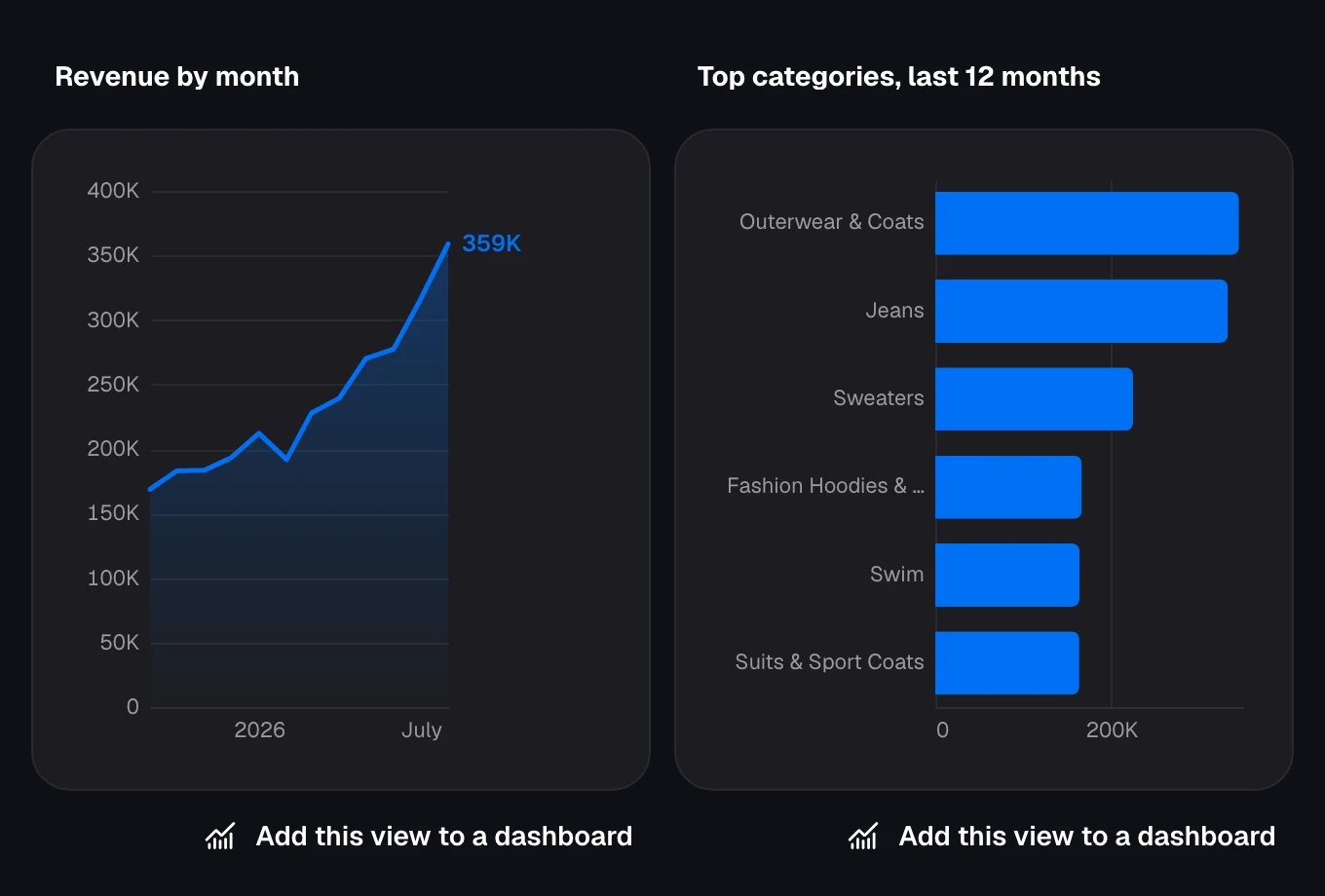
The view as Claude draws it, from Google's public e-commerce sample dataset.
03 Tools
24 tools, in the order you would use them.
An assistant finds the sources, reads what the columns actually mean, then queries. The rest exist because an answer nobody keeps is a message that scrolls away.
-
list_sourcesList data sourcesStart here — the ids every other tool expects.
-
get_data_contextRead a source's tables and what they meanTables, columns and types, with metric definitions, joins and column warnings.
-
record_data_contextWrite back what it learnedSo the next session starts where this one ended.
-
queryRun a queryRead-only SQL against one or more sources, inside your spend boundary, with a chart and table of the result where the host draws views.
-
render_uiShow something in the conversationCharts, tables and scorecards drawn from their queries, checked before you see them.
-
save_dashboardSave a dashboardTurn an answer into something that persists.
-
save_widgetAdd a widgetPut one chart on a board that already exists.
-
update_widgetChange a widgetFix a chart's query, title or look where it is.
-
remove_widgetRemove a widgetTake one off a board.
-
list_dashboardsList dashboardsThe boards you can add to.
-
get_dashboardRead a dashboardWhat is on a board right now.
-
update_dashboardUpdate a dashboardIts title, theme or who can see it.
-
delete_dashboardDelete a dashboardYours, when it is done.
-
publish_embedPublish an embedA public link, and the snippet to put it in a page.
-
watch_metricWatch a metricGet told when a number moves.
-
list_schedulesList watchesWhat is already running.
-
delete_scheduleStop a watchWhen you no longer need telling.
-
upload_fileAdd a file as a data sourceA CSV or Excel export, queried and charted like any other source.
-
replace_fileReplace a file's contentsToday's export in, the same table names kept: every dashboard on it shows the new rows.
-
create_file_uploadUpload a large fileA signed URL for a file too big to send in the call.
-
list_bigquery_projectsList Google Cloud projectsThe projects your Google account can connect, the ones with BigQuery data first.
-
connect_bigquery_projectConnect BigQueryA project's datasets in a team, through a read-only service account in it.
-
connect_databaseConnect a databasePostgreSQL, MySQL or Redshift, tested before it is saved; the password stays encrypted in Dataki.
-
connect_google_sheetConnect a Google SheetA sheet's tabs as tables, from its link.
04 Verifying
Check it from a terminal first.
Before wiring it into an assistant, open a session yourself. A valid key answers with the server's name and what it offers; no key returns a 401 that tells your client where to authenticate rather than just refusing it.
More on the assistantcurl -sX POST https://dataki.ai/api/mcp \
-H "Authorization: Bearer YOUR_DATAKI_API_KEY" \
-H "Content-Type: application/json" \
-H "Accept: application/json, text/event-stream" \
-d '{"jsonrpc":"2.0","id":1,"method":"initialize","params":{"protocolVersion":"2025-06-18","capabilities":{},"clientInfo":{"name":"curl","version":"1"}}}'SELECT plan, SUM(mrr) AS mrr
FROM billing.subscriptions
WHERE status = 'active'
GROUP BY plan
ORDER BY mrr DESCYour first month is free.
Connect a source, create a key, and point your assistant at it.